chrome://flags/#enable-gesture-navigation
Showing posts with label mobile. Show all posts
Showing posts with label mobile. Show all posts

Unlock Telstra 4G My Pocket WIFI LITE (ZTE MF90)
- Download and install the driver
- Download ZTE MF90 driver to a Windows 7 PC, extract the zip package
- Turn the device on, and connect it to Windows 7 PC via USB cable. It should detect the device and install the driver. For me it does not find the driver automatically. Instead it shows "ZTE xxx installation" unsuccessfully.
- Go to Control Panel then search and open Device Manager, you should see three unknown devices with name "ZTE xxx xxx xxx". Right click each unknown device, then select Update drivers, then select the directory where the ZTE MF90 driver was extracted to. NOTE: You need to update drivers for each unknown device.
- Download and run DCCRAP
- Google DCCRAP, download and make sure it does NOT contain virus (you can check the file using VirusTotal).
- Run DCCRAP on the Windows 7 PC, select ZTE data cards then Auto detect the device. Once the device is detected, you can click the Unlock button to unlock it.
- Set to use non-telstra APN
- Put a telstra sim into the device and turn it on
- Login the web portal in 192.168.0.1, using password: password
- Set apn to vfprepaymbb for Vodafone
Coolpad F1 8297W: How to install custom recovery?
- You need to root your 8297W mobile phone first.
- After rooting, install Mobile Uncle(YDSS) MTK tools from Google play store.
- You can install CWM or TWRP.
- Download CWM Recovery
- Download TWRP Recovery
- Extract the downloaded CWM or TWRP package, copy recovery.img file to your 8297W SD card's root directory.
- Open MobileUncle Tools (in your mobile) to install recovery update
see also
Coolpad F1 8297W: How to enter fastboot mode?
How to enter Fastboot Mode
- Turn off the mobile.
- Hold Volume Up, Volume Down and Power buttons until system starts.
see also
Coolpad F1 8297W: How to enter recovery mode?
How to enter Recovery Mode
- Turn off the mobile.
- Hold Volume Up and Power buttons until phone starts.
- It should display a little Android Icon with message "No command."
- Press Power button again to enter Recovery Mode.
- Use Volume Down button to move the cursor and use Volume Up button to enter the selected item.
see also
Coolpad F1 8297W: How to root?
Method 1: Use Baidu Root tool. You can try either PC version or Android version:
- Download Baidu Root for PC, install & run it on your pc, you will need to connect your mobile to the pc to root.
- Download Baidu Root for Mobile (APK), install & run it on your mobile.
Method 2: Manual root
- Download Official_root.zip and copy it to the phone's SD card.
- Turn off the phone.
- Hold Volume Up and Power buttons to start the phone and enter Recovery Mode, until see the Android icon with message "No command". Press Power button again to see the menu.
- Use Volume Down button to move cursor to "Apply software update from SD card", press Volume Up to select it.
- Select Official_root.zip then press Volume Up to install it
- After installation, restart the phone. You should see a app named SU.
see also
Coolpad F1 8297W: ROM Update Guide
- First, you need to root your coolpad F1 8297W mobile phone.
- Install Custom Recovery. You can install eitherCWM or TWRP.
- Copy the ROM zip file to your 8297W mobile's SD card.
- Turn off the phone.
- Hold Volume Up and Power buttons to get into recovery mode.
- In the main menu of the recovery mode, select "wipe data/factory reset" to clear all user data.
- In the main menu of the recovery mode, select "wipe cache partition" to clear cache.
- In the main menu of the recovery mode, select "install zip from sdcard" then select the ROM zip file from SD card to install.
- Complete flashing. First reboot may take a while.
see also
Coolpad 大神 F1 8297W安装Google 应用商店
- 1. 下载presetgms-Coolpad 8297W.zip
- 2. 将下载后的文件置于 /storage/emulated/0 目录。(注意: 文件名必须是 presetgms-Coolpad 8297W.zip,中间有一个空格。
- 3. 进入系统设置—关于手机,连续点击8次"版本号",进入开发者模式,即按返回键退出关于手机能够看到"开发者选项";
- 4. 点击进入开发者选项,下拉到最后面找到“GMS包预安装”选项,点击,系统提示“将重启手机进行GMS包安装”,点击确定进行安装;
- 5. 安装完成后,会自动开机,开机完成进入应用即可查看到安装的GMS包应用
- 6. 到Coolpad自带应用商店更新Google Play应用,之后就可以从Google Play应用商店安装应用
See also
Free eBook: Programming Windows 8 Apps with HTML, CSS, and JavaScript
- Programming Windows 8 Apps with HTML, CSS, and JavaScript
- EPUB format is here: http://go.microsoft.com/FWLink/?Linkid=272592 (37.3 MB)
- MOBI format is here: http://go.microsoft.com/FWLink/?Linkid=272591 (69.5 MB)
- companion content
Nokia 2730 刷中文 firmware
所需工具软件:
所需步骤:
- Nemesis Service Suite (NSS) 1.0.38.14 or 1.0.38.15 for Windows 7
- Nokia Software Updater (NSU) as part of Nokia Suite
所需步骤:
- 下载Nemesis Service Suite (NSS) 并安装。在安装过程中, 遇到 “'Select from the following the service devices you will be using after the installation” 选择 “Virtual USB device”
- 下载Nokia Suite并安装。
- (如需要)用USB线连接手机,并用Nokia Suite所提供的工具备份手机的通讯录,短信等,然后退出Nokia Suite。
- 用NSS改成中文Code:
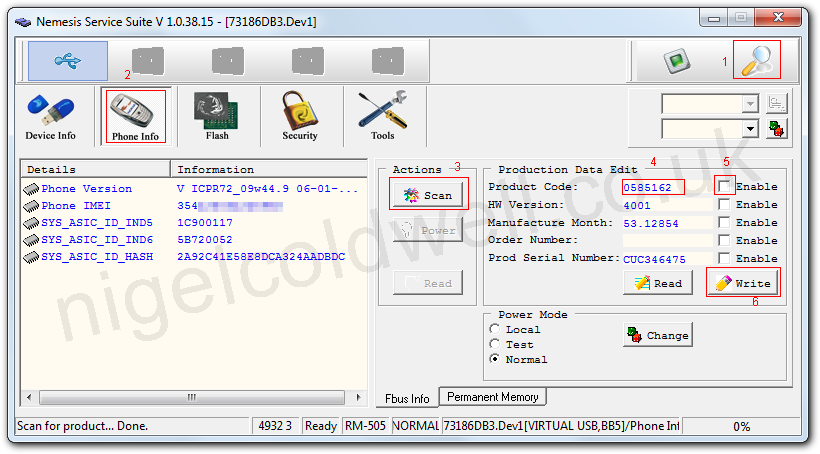
- 用USB线连接手机,启动NSS, 点击“Scan for new device”
- 然后点 “Phone info”之后点“Scan”
- 输入中文code (如0585310为马来西亚中文) (其他可用中文code)
- 选上“Enable”
- 点“Write”写入code,几秒钟就可完成。完成后可以重新连接NSS,然后点"Read"按钮检查是否写入成功。
- 退出NSS
- 运行Nokia Suite里的Nokia Software Updater 升级,升级就是安装中文的固件Firmware.升级之后,手机的界面就可以是中文,也有中文的输入法了。如果之前备份了通讯录,可以用Nokia Suite恢复。
注意:
上述办法,只适用于你当前软件版本号(比如我的是RM578,澳大利亚,code:0591956,软件10.45)低于你要刷的国家(地区)的版本号(比如RM578,马来西亚,code:0585310,软件10.47)而且RM必须相同。See also
Nokia 2730 中文 code (用于刷中文)
下面是可用于刷中文的code:
0585310 10.40 RM-578 SEAP_S_BLACK_STROKE_MALAY
0585563 10.40 RM-578 SEAP_S_RED_STROKE_MALAY
0585324 10.40 RM-578 CHINA_QA_BLACK_STROKE_CHINA
0585325 10.40 RM-578 CHINA_QB_BLACK_STROKE_HK
059C0R1 RM-578 2730c-1 SEAP-X CTV ID NLT MAGENT
059C0R4 RM-578 2730c-1 SEAP-X CTV ID NLT BLACK
0585310 10.40 RM-578 SEAP_S_BLACK_STROKE_MALAY
0585563 10.40 RM-578 SEAP_S_RED_STROKE_MALAY
0585324 10.40 RM-578 CHINA_QA_BLACK_STROKE_CHINA
0585325 10.40 RM-578 CHINA_QB_BLACK_STROKE_HK
059C0R1 RM-578 2730c-1 SEAP-X CTV ID NLT MAGENT
059C0R4 RM-578 2730c-1 SEAP-X CTV ID NLT BLACK
See Also
Nokia 2730 codes
0584989 10.40 RM-578 EURO_AD1_BLACK_LATIN_GERMAN
0585569 10.40 RM-578 CHINA_QA_RED_STROKE_CHINA
0585540 10.40 RM-578 EURA_EO_RED_ARME_ARMENIA
0585308 10.40 RM-578 SEAP_T_BLACK_LATIN_PHILIPPINE
0585512 10.40 RM-578 EURO_AB_RED_LATIN_FINLAND
0588495 10.40 RM-578 SEAP_T_BLACK_LATIN_PHLIGHTSWAP
0584994 10.40 RM-578 EURO_AG_BLACK_LATIN_PORTUG
0588467 10.40 RM-578 EURA_EL_BLACK_LATIN_RUSSIASWAP
0585016 10.40 RM-578 EURA_EM_BLACK_RUSCY_CE-ASIA1
0585021 10.40 RM-578 EURA_EO_BLACK_GEOR_GEORGIA
0585325 10.40 RM-578 CHINA_QB_BLACK_STROKE_HK
0588478 10.40 RM-578 MEA_M_A_BLACK_ARABIC_SWAP
0585570 10.40 RM-578 CHINA_QB_RED_STROKE_HK
0585535 10.40 RM-578 EURA_EM_RED_RUSCY_CE-AS1
0595019 10.40 RM-578 INDIA_MH_RED_LATIN_OVERAL
0585517 10.40 RM-578 EURO_AE_RED_LATIN_FRANCE
0585313 10.40 RM-578 SEAP_V_BLACK_STROKE_VIETNAM
0585323 10.40 RM-578 INDIA_ML_BLACK_ORIYA_OVERALL
0585568 10.40 RM-578 SEAP_U_RED_THAI_THAILAND
0585566 10.40 RM-578 SEAP_V_RED_STROKE_VIETNAM
0585558 10.40 RM-578 SEAP_MR_RED_LATIN_NEPAL
0588470 10.40 RM-578 EURA_AD2_BLACK_LATIN_TURKEYSWAP
0585455 10.40 RM-578 CHINA_QB_GRAY_STROKE_HK
0585564 10.40 RM-578 SEAP_MR_RED_LATIN_SRILA
0585548 10.40 RM-578 MEA_M_H_RED_LATIN_MEA15
0588492 10.40 RM-578 EURO_AE_BLACK_LATIN_ROWLIGHTSWAP
0585347 10.40 RM-578 MEA_M_P_BLACK_AMHARIC_MEA23
0585342 10.40 RM-578 MEA_M_J_BLACK_LATIN_MEA17
0585530 10.40 RM-578 EURO_EK_RED_RUSCY_BULGA
0585338 10.40 RM-578 MEA_M_C_BLACK_ARABIC_MEA8
0592339 10.40 RM-578 EURO_AD1_BLACK_LATIN_MALTA
0585340 10.40 RM-578 MEA_M_H_BLACK_LATIN_MEA15
0585526 10.40 RM-578 EURO_EF_RED_LATIN_LATVIA
0585448 10.40 RM-578 INDIA_MK_GRAY_KANNA_OVERALL
0585007 10.40 RM-578 EURO_ER_BLACK_HEBREW_ISRAEL
0585533 10.40 RM-578 EURA_AD2_RED_LATIN_TURKEY
0585316 10.40 RM-578 INDIA_MH_BLACK_HINDI_OVERALL
0585003 10.40 RM-578 EURO_EH_BLACK_LATIN_LITHUA
0585537 10.40 RM-578 EURA_EJ_RED_RUSCY_UKRAINE
0585543 10.40 RM-578 MEA_M_A_RED_LATIN_MEA5
0585521 10.40 RM-578 EURO_EA_RED_LATIN_POLAND
0585453 10.40 RM-578 INDIA_ML_GRAY_ORIYA_OVERALL
0584991 10.40 RM-578 EURO_AE_BLACK_LATIN_UKIREL
0585541 10.40 RM-578 EURA_EO_RED_GEOR_GEORGIA
0584998 10.40 RM-578 EURO_EC_BLACK_LATIN_CZECH
0586807 10.40 RM-578 CTR EURO AE BLAC LATIN ITALY
0590159 10.40 RM-578 MEA_M_H_BLACK_LATIN_SASWAP
0585326 10.40 RM-578 CHINA_QC_BLACK_BOPO_TW
0585450 10.40 RM-578 INDIA_MK_GRAY_TELUG_OVERALL
0585020 10.40 RM-578 EURA_EO_BLACK_ARME_ARMENIA
0585447 10.40 RM-578 INDIA_MK_GRAY_MALAY_OVERALL
0585516 10.40 RM-578 EURO_AE_RED_LATIN_UK
0585456 10.40 RM-578 CHINA_QC_GRAY_BOPO_TW
0584997 10.40 RM-578 EURO_EB_BLACK_LATIN_SERBIA
0585321 10.40 RM-578 INDIA_MI_BLACK_PUNJA_OVERALL
0585335 10.40 RM-578 MEA_M_A_BLACK_LATIN_MEA5
0585014 10.40 RM-578 EURA_AD2_BLACK_LATIN_TURKEY
0588486 10.40 RM-578 EURO_ER_RED_HEBREW_SWAP
0588480 10.40 RM-578 EURO_AE_RED_LATIN_ROWSWAP
0584995 10.40 RM-578 EURO_AH_BLACK_GREEK_GREE
0585551 10.40 RM-578 MEA_M_N_RED_LATIN_MEA18
0585309 10.40 RM-578 SEAP_MS_BLACK_LATIN_BANGALA
0585561 10.40 RM-578 SEAP_T_RED_LATIN_PHILIPP
0585452 10.40 RM-578 INDIA_ML_GRAY_BENGA_OVERALL
0585531 10.40 RM-578 EURO_ER_RED_HEBREW_ISRAEL
0585002 10.40 RM-578 EURO_EG_BLACK_LATIN_ESTONIA
0585523 10.40 RM-578 EURO_EC_RED_LATIN_CZECH
0585000 10.40 RM-578 EURO_ED_BLACK_MACCYR_MACEDON
0585305 10.40 RM-578 SEAP_MR_BLACK_LATIN_NEPALSA
0585318 10.40 RM-578 INDIA_MK_BLACK_KANNA_OVERALL
0588474 10.40 RM-578 EURO_AH_BLACK_LATIN_GREEKSWAP
0585519 10.40 RM-578 EURO_AG_RED_LATIN_PORTUG
0588489 10.40 RM-578 MEA_M_C_RED_ARABIC_SWAP
0585307 10.40 RM-578 SEAP_T_BLACK_LATIN_NEW_ZEALAND
0585528 10.40 RM-578 EURO_EH_RED_LATIN_LITHUA
0585553 10.40 RM-578 MEA_M_L_RED_LATIN_MEA21
0588483 10.40 RM-578 EURA_EJ_RED_LATIN_UKRAINESWAP
0585536 10.40 RM-578 EURA_EJ_RED_RUSCY_MOLDOVA
0585832 10.40 RM-578 SEAP_S_BLACK_STROKE_SINGA
0585017 10.40 RM-578 EURA_EJ_BLACK_RUSCY_MOLDOVA
0584988 10.40 RM-578 EURO_AC_BLACK_LATIN_ICELAND
0585317 10.40 RM-578 INDIA_MK_BLACK_MALAY_OVERALL
0588472 10.40 RM-578 EURO_ER_BLACK_HEBREW_SWAP
0585341 10.40 RM-578 MEA_M_H_BLACK_LATIN_MEA16
0585001 10.40 RM-578 EURO_EF_BLACK_LATIN_LATVIA
0585339 10.40 RM-578 MEA_M_F_BLACK_LATIN_MEA14
0585314 10.40 RM-578 SEAP_VC_BLACK_KHMER_CAMBODIA
0585555 10.40 RM-578 MEA_M_P_RED_AMHAR_MEA23
0585311 10.40 RM-578 SEAP_MR_BLACK_LATIN_SRILA
0584992 10.40 RM-578 EURO_AE_BLACK_LATIN_FRANCE
0585538 10.40 RM-578 EURA_EL_RED_RUSCY_RUSSIA
0585544 10.40 RM-578 MEA_M_C_RED_URDU_MEA6
0585315 10.40 RM-578 SEAP_U_BLACK_THAI_THAILAND
0585345 10.40 RM-578 MEA_M_L_BLACK_LATIN_MEA21
0584985 10.40 RM-578 EURO_AA_BLACK_LATIN_DEMARK
0584990 10.40 RM-578 EURO_AE_BLACK_LATIN_AUSTRI
0585454 10.40 RM-578 CHINA_QA_GRAY_STROKE_CHINA
0585511 10.40 RM-578 EURO_AA_RED_LATIN_DEMARK
0585324 10.40 RM-578 CHINA_QA_BLACK_STROKE_CHINA
0586808 10.40 RM-578 EURO_AE_RED_LATIN_ITALY
0585567 10.40 RM-578 SEAP_VC_RED_KHMER_CAMBOD
0585518 10.40 RM-578 EURO_AF_RED_LATIN_BELGIU
0588488 10.40 RM-578 EURO_AH_RED_LATIN_GREEKSWAP
0588485 10.40 RM-578 MEA_M_H_RED_LATIN_SASWAP
0585525 10.40 RM-578 EURO_ED_RED_MACCY_MACED
0585337 10.40 RM-578 MEA_M_C_BLACK_FARSI_MEA7
0585520 10.40 RM-578 EURO_AH_RED_GREEK_GREE
0585435 10.40 RM-578 BRAZ_UAB_BLACK_LATIN_BRAZIL
0585563 10.40 RM-578 SEAP_S_RED_STROKE_MALAY
0585542 10.40 RM-578 MEA_M_A_RED_ARABIC_MEA1
0585312 10.40 RM-578 SEAP_X_BLACK_STROKE_INDONESIA
0585514 10.40 RM-578 EURO_AD1_RED_LATIN_GERMAN
0585559 10.40 RM-578 SEAP_T_RED_LATIN_AUSTR
0585571 10.40 RM-578 CHINA_QC_RED_BOPO_TW
0585565 10.40 RM-578 SEAP_X_RED_STROK_INDON
0585343 10.40 RM-578 MEA_M_N_BLACK_LATIN_MEA18
0585346 10.40 RM-578 MEA_M_O_BLACK_LATIN_MEA22
0585336 10.40 RM-578 MEA_M_C_BLACK_URDU_MEA6
0585522 10.40 RM-578 EURO_EB_RED_LATIN_SERBIA
0588482 10.40 RM-578 EURA_AD2_RED_LATIN_TURKEYSWAP
0588498 10.40 RM-578 SEAP_S_BLACK_STROKE_SILIGHTSWAP
0588481 10.40 RM-578 EURA_EL_RED_LATIN_RUSSIASWAP
0585513 10.40 RM-578 EURO_AC_RED_LATIN_ICELAND
0585320 10.40 RM-578 INDIA_MK_BLACK_TELUG_OVERALL
0585515 10.40 RM-578 EURO_AE_RED_LATIN_AUSTRI
0592351 10.40 RM-578 CHINA_QA_BLACK_STROKE_LIGHTSWAP
0592340 10.40 RM-578 EURO_AD1_RED_LATIN_MALTA
0588471 10.40 RM-578 EURA_EJ_BLACK_LATIN_UKRAINESWAP
0585545 10.40 RM-578 MEA_M_C_RED_FARSI_MEA7
0585550 10.40 RM-578 MEA_M_J_RED_LATIN_MEA17
0585529 10.40 RM-578 EURO_EE_RED_LATIN_ROMANIA
0585334 10.40 RM-578 MEA_M_A_BLACK_ARABI_MEA12
0585547 10.40 RM-578 MEA_M_F_RED_LATIN_MEA14
0585562 10.40 RM-578 SEAP_MS_RED_LATIN_BANGALA
0585552 10.40 RM-578 MEA_M_K_RED_LATIN_MEA19
0585322 10.40 RM-578 INDIA_ML_BLACK_BENGA_OVERALL
0584987 10.40 RM-578 EURO_AB_BLACK_LATIN_FINLAND
0584996 10.40 RM-578 EURO_EA_BLACK_LATIN_POLAND
0585451 10.40 RM-578 INDIA_MI_GRAY_PUNJA_OVERALL
0585534 10.40 RM-578 EURA_EN_RED_RUSCY_CE-AS2
0585344 10.40 RM-578 MEA_M_K_BLACK_LATIN_MEA19
0585306 10.40 RM-578 SEAP_T_BLACK_LATIN_AUSTRALIA
0585004 10.40 RM-578 EURO_EE_BLACK_LATIN_ROMANIA
0585310 10.40 RM-578 SEAP_S_BLACK_STROKE_MALAY
0588463 10.40 RM-578 EURO_AE_BLACK_LATIN_ROWSWAP
0585449 10.40 RM-578 INDIA_MK_GRAY_TAMIL_OVERALL
0585524 10.40 RM-578 EURO_ED_RED_LATIN_SLOVA
0585444 10.40 RM-578 INDIA_MH_BLACK_GUJARA_OVERALL
0585319 10.40 RM-578 INDIA_MK_BLACK_TAMIL_OVERALL
0585549 10.40 RM-578 MEA_M_H_RED_LATIN_MEA16
0585446 10.40 RM-578 INDIA_MH_GRAY_GUJAR_OVERALL
0585833 10.40 RM-578 SEAP_S_RED_STROKE_SINGAP
0585433 10.40 RM-578 LTA_UAL_BLACK_LATIN_LTA
0585013 10.40 RM-578 EURA_EI_BLACK_LATIN_CIS
0584999 10.40 RM-578 EURO_ED_BLACK_LATIN_SLOVA
0585532 10.40 RM-578 EURA_EI_RED_LATIN_CIS
0585019 10.40 RM-578 EURA_EL_BLACK_RUSCY_RUSSIA
0585015 10.40 RM-578 EURA_EN_BLACK_RUSCY_CE-ASIA2
0585554 10.40 RM-578 MEA_M_O_RED_LATIN_MEA22
0584993 10.40 RM-578 EURO_AF_BLACK_LATIN_BELGIU
0585527 10.40 RM-578 EURO_EG_RED_LATIN_ESTONIA
0585441 10.40 RM-578 INDIA_MH_GRAY_HINDI_OVERALL
0585006 10.40 RM-578 EURO_EK_BLACK_RUSCY_BULGARIA
059C0R1 RM-578 2730c-1 SEAP-X CTV ID NLT MAGENT
059C0R4 RM-578 2730c-1 SEAP-X CTV ID NLT BLACK
How to flash official KDZ ROM updates for your LG P690 mobile phone
- You need a Windows PC (Windows XP sp3 or Windows 7 32/64 bit)
- Find and download the official ROM/firmware update for your LG P690 (P690F) mobile phone.
- Download and install Windows USB driver
- Download and install Software Update utility
- Download and extract KDZ_FW_UPD_EN.7z
- Configure your phone: Settings -> Applications -> Development, Tick USB Debugging
- Connect your phone to the Windows PC using USB cable and wait until all the drivers are installed automatically
- Connect the phone but DO NOT turn on USB storage
- Run KDZ_FW_UPD.exe as Administrator
- Set Type: 3GQCT Phone Mode: DIAG
- Select the .kdz file you downloaded in step 1
- Press Lauch Software Update to start and wait (for 6~10 minutes) until you see --FINISHED-- line. (In the meantime, your phone gets into Emergency mode.)
- The phone should reboot itself. For me, it failed to reboot, it hangs in the LG splash logo then reboots again infinitely. To fix it, turn off the phone and then press and hold the [Power] + [Volume Down] + [Home] buttons. Wait till you see the droid with the progress bar under it then release the buttons.
See also:
Fix your bricked LG P690 mobile phone
- NOTE: If the phone hangs at the splash LG logo, the phone may not be really bricked. Try the following to fix it:
- Turn off the phone and then press and hold the [Power] + [Volume Down] + [Home] buttons. Wait till you see the droid with the progress bar under it then release the buttons.
- To fix the bricked LG P690:
- Press and hold [Power] + [Volume Up] + [Return] buttons until gets into yellow emergency mode
- Connect the phone to the Windows PC using USB data cable
- Follow this guide to flash the official stock ROM
SEE ALSO
- Thanks to the author of this post from a chinese LG mobile forum
Download official firmware/ROM updates for your LG mobile phones
- Find your mobile phone's IMEI number, type *#06# on the dial pad, and take down the IMEI number.
- In your web browser's address field, type the following address: http://csmg.lgmobile.com:9002/csmg/b2c/client/auth_model_check2.jsp?esn=XXXXXXXXXXXXXXX
where XXXXXXXXXXXXXXX should be replaced with your IMEI number - Load the page and view page source, you can get the ROM update url inside <sw_url></sw_url> tag.
Telstra LG Optimus Spirit P690F V10F Chinese ROM
- Official Web Page
- Purchase unlock code from ebay
- How to flash V10F_00.kdz ROM(China Chinese/English)
- You need a Windows PC (Windows XP sp3 or Windows 7 32/64 bit)
- Download the V10F_00.kdz ROM(China Chinese/English)
- Download and install Windows USB driver
- Download and install Software Update utility
- Download and extract KDZ_FW_UPD_EN.7z
- Configure your phone: Settings -> Applications -> Development, Tick USB Debugging
- Connect your phone to the Windows PC using USB cable and wait until all the drivers are installed automatically
- Connect the phone but DO NOT turn on USB storage
- Run KDZ_FW_UPD.exe as Administrator
- Set Type: 3GQCT Phone Mode: DIAG
- Select the V10F_00.kdz file
- Press Lauch Software Update to start and wait (for 6~10 minutes) until you see --FINISHED-- line. (In the meantime, your phone gets into Emergency mode.)
- The phone should reboot itself. For me, it failed to reboot, it hangs in the LG splash logo then reboots again infinitely. To fix it, turn off the phone and then press and hold the Power + Volume Down + Home buttons. Wait till you see the droid with the progress bar under it then release the buttons.
LG P690 Official ROM updates (.kdz)
- How to download official stock ROM for LG phone
- Indian LG P690 V10E ROM
- Australian Telstra LG P690F V10C ROM
- LG P690 (China) Chinese V10F ROM
See also
TPG Mobile APN Settings
Android Phones
Mobile data settings
Go to Settings -> Wireless & Networks -> Mobile Networks -> Access Point Names -> Tap your phone's menu button -> New APN
And then fill in the fields as below:
MMS settings
Go to Settings -> Wireless & Networks -> Mobile Networks -> Access Point Names -> Tap your phone's menu button -> New APN
And then fill in the fields as below:
iPhone (note: unlocked iPhone only)
Mobile data settings
Go to Home -> Settings -> Phone -> Network -> Cellular Data Network
And then fill in the fields as below:
MMS settings
Go to Home -> Settings -> Phone -> Network -> Cellular Data Network
And then fill in the fields as below:
Other Phones (Generic Settings)
Mobile data settings
MMS settings
Mobile data settings
Go to Settings -> Wireless & Networks -> Mobile Networks -> Access Point Names -> Tap your phone's menu button -> New APN
And then fill in the fields as below:
| Name | Optus Yes Internet |
| APN | yesinternet |
| Proxy | (blank) |
| Port | (blank) |
| Username | (blank) |
| Password | (blank) |
| Server | (blank) |
| MMSC | (blank) |
| MMS Proxy | (blank) |
| MMS Port | (blank) |
| MMS Protocol | (blank) |
| MCC | 505 |
| MNC | 02 |
| APN Type | default |
MMS settings
Go to Settings -> Wireless & Networks -> Mobile Networks -> Access Point Names -> Tap your phone's menu button -> New APN
And then fill in the fields as below:
| Name | Optus MMS |
| APN | mms |
| Proxy | 202.139.83.152 |
| Port | 8070 |
| Username | (blank) |
| Password | (blank) |
| Server | (blank) |
| MMSC | http://mmsc.optus.com.au:8002/ |
| MMS Proxy | 61.88.190.10 |
| MMS Port | 8070 |
| MMS Protocol | WAP2.0 |
| MCC | 505 |
| MNC | 2 |
| APN Type | mms |
iPhone (note: unlocked iPhone only)
Mobile data settings
Go to Home -> Settings -> Phone -> Network -> Cellular Data Network
And then fill in the fields as below:
| APN | internet |
| Username | (blank) |
| Password | (blank) |
| MMSC | (blank) |
| MMS Proxy | (blank) |
MMS settings
Go to Home -> Settings -> Phone -> Network -> Cellular Data Network
And then fill in the fields as below:
| APN | mms |
| Username | (blank) |
| Password | (blank) |
| MMSC | mmsc.optus.com.au:8002 |
| MMS Proxy | 61.88.190.10:8070 |
Other Phones (Generic Settings)
Mobile data settings
| APN | internet OR yesinternet |
| Username | (blank) |
| Password | (blank) |
| Leave everything else as default | |
MMS settings
| APN | mms |
| Username | (blank) |
| Password | (blank) |
| MMSC | mmsc.optus.com.au:8002 |
| MMS Proxy | 61.88.190.10 |
| MMS Port | 8070 |
Subscribe to:
Posts (Atom)